Study what arrives, what overlaps, and when the interface takes over.
Six opening sequences, mapped against the actual source frames. Follow a timing bar into the film, compare the key states, then inspect a short transition one frame at a time.
Read across a lane to follow text, graphic objects, a pointer, or the product interface. Lane names describe what is visible, not the creator’s project files.
Compare vertical overlap to see what shares the frame. A readable hold is different from an entrance; a persistent object is different from a new shot.
Select a bar or keyframe to seek the silent video. Use ¼× speed or frame controls to inspect the handoff. The ◆ marks a proposed cue adaptation.
01 / 30.000 fps / 0.000–14.000s
Atlas: remove in pairs, then reveal the browser
A six-icon dock becomes one retained app icon before a title and a gradual reveal of browser context.
Bars: sampled visible states, not source keyframes. Select a bar to inspect its starting frame. The ◆ is a proposed cue, not an observed OBS event.
Read the timing diagram as text
Lane / interval
Source time
Observed state
0.133–2.000s
Build and hold the row The dock gains the new app and holds the combined row. Sampled span; broad boundaries ±125 ms.
2.000–2.500s
Grouped removals Successive groups leave until only Atlas remains. This broad bar summarizes the native-checked steps; boundaries ±125 ms.
2.500–3.367s
Retained icon hold One app icon remains on white before the title. Sampled span; broad boundaries ±125 ms.
3.500–4.867s
Build with a word-level pause Partial title states include a pause after ChatGPT before Atlas completes. Sampled span; broad boundaries ±125 ms.
4.867–6.366s
Readable complete-title hold The complete title persists across these samples. This is a reading interval, not a claim that every pixel is static; boundaries ±125 ms.
6.500–8.633s
Isolated prompt A prompt bar and small symbol are visible before full browser context. Sampled span; broad boundaries ±125 ms.
8.733–11.366s
Reveal browser surroundings The input becomes smaller within a larger window view. Sampled span; broad boundaries ±125 ms.
11.500–13.967s
Query entry and pointer approach Suggestions, typed content, and later pointer movement occupy the now-established browser. Sampled span; broad boundaries ±125 ms.
Frame controls and diagram links load this short clip into memory for reliable source-cadence seeking. The player can step every frame; only the specifically stated window received consecutive-frame visual inspection.
Read the sequence.
What the opening is doing
The opening first establishes a familiar row of applications. The Atlas icon joins that row, holds with its neighbors, then survives three separate reductions. A centered title follows. The later sampled sequence introduces a nearly isolated prompt bar before showing the surrounding browser window and a typed query. These are distinct presentation steps; the opener does not rush directly from the app icon to an already-busy screen.
The consecutive-frame check resolves a six-to-four-to-two-to-one reduction. Finder and Clock disappear first, Notes and Calendar next, then the ChatGPT icon and shared dock container. The retained Atlas icon remains recognizable throughout.
The surviving icons remain near their previous size while the row and container become narrower. This is not one uniform scale-down of the entire six-icon composition.
The sampled title pauses after the ChatGPT name before completing Atlas. The completed line remains readable from the 4.867 s anchor through the 6.366 s sample.
The prompt bar is shown before full browser context. Browser chrome and a colored surround appear later; the first query and pointer activity follow that context reveal.
Typography
At 125 ms sampling, the growing title shifts its left edge as its width increases, keeping the phrase near the center. Partial suffixes are visible, followed by a separate completed-title hold. This pass does not recover individual-letter onset times for that title.
Handoff into the product
The title is replaced by a standalone prompt bar in the 6.500 s sample. Subsequent samples widen the context until the browser window, chrome, and colored surround are visible. The native window studies the earlier dock reduction, not the exact title-to-prompt edit.
Inspect the consecutive-frame window · 22 frames
1.933000–2.667000s, end exclusive. All 22 frames from source f58 through f79 were inspected. Six icons remain through f60 (2.000 s); f61 (2.033 s) has four, without the two outside icons. Four persist through f66; f67 (2.233 s) retains only ChatGPT and Atlas. Those two remain through f73; f74 (2.467 s) shows Atlas alone, without the shared white container. Atlas then shifts toward its solo position. The intermediate four-icon and two-icon states last multiple decoded frames, so the reduction is demonstrably staged rather than a single disappearance between coarse samples.
Half-open source interval [1.933, 2.667) s, f58–f79 inclusive. This checks removal order and retained-object continuity only. The dock arrival, title typing, and browser reveal outside the window remain sampled observations. Reduced-resolution frames cannot identify the authoring method or original easing. Source indices are zero-based. Every image in this strip corresponds to a decoded source frame; no in-between frames have been generated.
02 / 60.000 fps / 0.000–13.000s
ChatGPT Work: character changes and centering have different rhythms
A colored suffix builds letter by letter while the existing black phrase shifts left; color changes continue between letter arrivals.
Bars: sampled visible states, not source keyframes. Select a bar to inspect its starting frame. The ◆ is a proposed cue, not an observed OBS event.
Read the timing diagram as text
Lane / interval
Source time
Observed state
0.000–1.367s
Symbol into app tile The symbol changes before a rounded tile surrounds it. Sampled span; broad boundaries ±125 ms.
1.367–2.867s
App tile hold The tile remains alone before the text introduction. Sampled span; broad boundaries ±125 ms.
3.000–5.367s
Title build with pauses The prefix and colored suffix build with intervening readable word states. Sampled span; broad boundaries ±125 ms.
5.367–6.367s
Readable product-title hold The complete line remains visible before replacement. Sampled span; broad boundaries ±125 ms.
6.500–7.867s
Second statement builds and wraps The line expands into a two-line statement. Sampled span; broad boundaries ±125 ms.
7.867–9.117s
Readable statement hold Completed wording is retained before the interface appears. Sampled span; broad boundaries ±125 ms.
11.617–12.983s
Model-label transition A numeral-and-dot presentation gives way to a model label after the input passage. Sampled span; broad boundaries ±125 ms.
9.250–10.367s
Placeholder changes The close input changes from Ask anything to Do anything before its supporting row is established. Sampled span; broad boundaries ±125 ms.
10.367–11.500s
Context row builds, then holds Project context appears, followed by permissions information. Sampled span; broad boundaries ±125 ms.
Frame controls and diagram links load this short clip into memory for reliable source-cadence seeking. The player can step every frame; only the specifically stated window received consecutive-frame visual inspection.
Read the sequence.
What the opening is doing
The film opens with the symbol and app tile before its title. The title builds in recognizable chunks with pauses, gives the final product word a changing color, then holds the completed phrase. A second statement wraps onto two lines before the product input appears. The input placeholder changes before a contextual project-and-permissions row is added beneath it.
In the native window, the existing black phrase shifts left after the first colored letter appears. Letter arrival and positional settling are separate visible actions.
The suffix is not revealed at one constant character interval. W appears at f291, Wo at f297, Wor at f305, and Work at f321. Color changes also occur while the visible letters stay the same.
The completed product title gets a readable hold before the next statement. That statement also completes and holds before any input UI appears.
The sampled input presentation stages its information: placeholder first, then its changed wording, then the project-and-permissions row. The interface is not introduced with all these details already present.
Typography
This native check supports a centered growing line with continued repositioning between discrete character states. The suffix cycles through blue, green, orange, pink, and red before the complete blue word. These visible color stages are not evidence of a particular interpolation or animation API. The later line wrap was sampled, not inspected frame by frame.
Handoff into the product
After the two-line statement holds, the 9.250 s sample shows a close view of the input. Context is added beneath that input in later samples. The first 13 s contain this UI introduction and a subsequent model-label transition, not a complete task demonstration.
Inspect the consecutive-frame window · 51 frames
4.750000–5.600000s, end exclusive. All 51 frames from f285 through f335 were inspected. The prefix remains without a suffix through f290. A blue W appears at f291 (4.850 s), green Wo at f297 (4.950 s), orange Wor at f305 (5.083333 s), and full blue Work at f321 (5.350 s). Between f291 and f296 the existing phrase continues moving left despite unchanged letters. Color changes also happen without a new character: Wo turns orange at f303, and Wor changes to pink at f309 and red at f315. The complete word then remains through the end of the window. Character count, color stage, and line positioning therefore do not share one simple step clock.
Half-open source interval [4.750, 5.600) s, f285–f335 inclusive. The exact suffix states and frame-to-frame repositioning were inspected, but no optical centering metric or original easing was measured. Earlier word timing, later line wrapping, and the UI handoff remain 125 ms sampled observations. Source indices are zero-based. Every image in this strip corresponds to a decoded source frame; no in-between frames have been generated.
03 / 60.000 fps / 0.000–13.000s
Workspace agents: whole-word steps, then a letter-by-letter finish
The pointer and rotating plus accompany a phrase that switches from grouped word arrivals to individual letters.
Bars: sampled visible states, not source keyframes. Select a bar to inspect its starting frame. The ◆ is a proposed cue, not an observed OBS event.
Read the timing diagram as text
Lane / interval
Source time
Observed state
0.117–1.000s
Short introduction The opening word completes and holds before replacement. Sampled span; broad boundaries ±125 ms.
1.117–1.617s
Two-line title build The larger product title fills two lines. Sampled span; broad boundaries ±125 ms.
1.617–2.867s
Readable title hold The complete wording remains visible while nearby pointer movement settles. Sampled span; broad boundaries ±125 ms.
3.000–4.500s
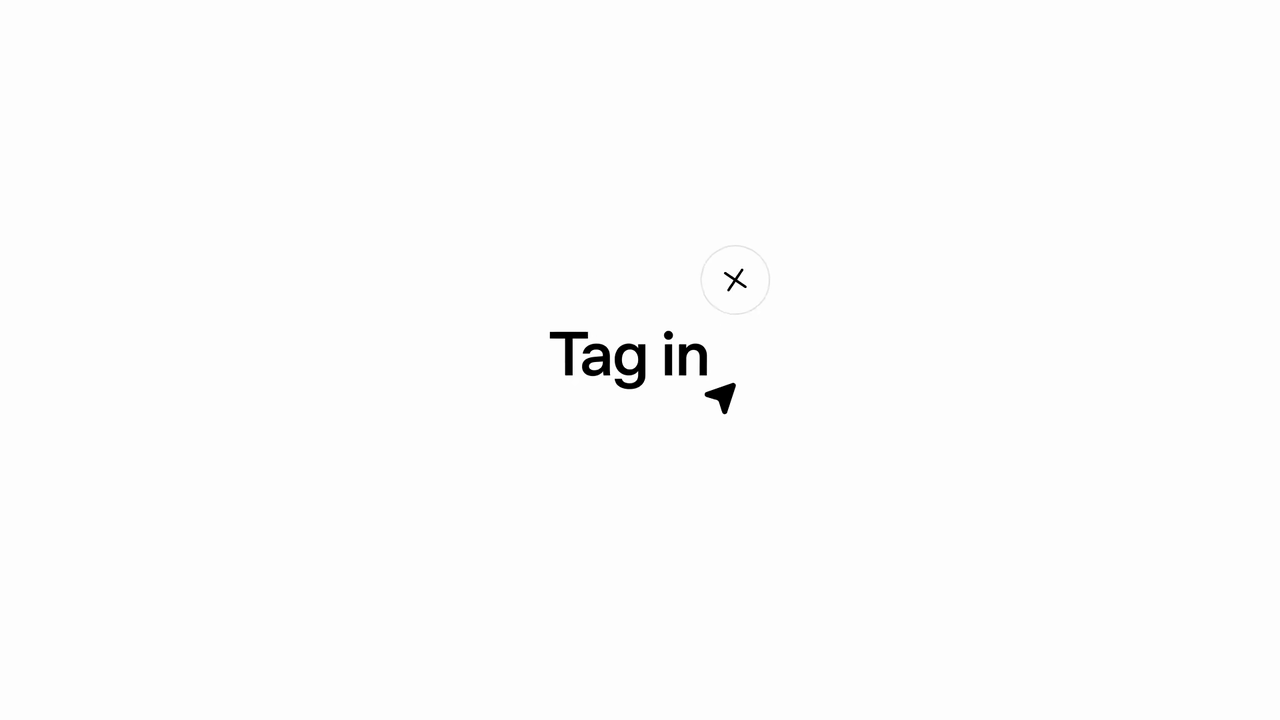
Short phrase becomes a sentence Tag in expands with the mixed cadence resolved by the native window. Broad timeline boundaries ±125 ms.
4.500–5.617s
Readable sentence hold The complete wording remains while the pointer approaches the plus. Sampled span; broad boundaries ±125 ms.
7.867–8.867s
Second statement builds The white text scene returns after the card strip and gains its second line. Sampled span; broad boundaries ±125 ms.
8.867–10.250s
Readable statement hold The completed statement persists before the sidebar appears. Sampled span; broad boundaries ±125 ms.
1.117–2.867s
Approach the title edge The pointer is a separate visible element near the growing title. Sampled span; broad boundaries ±125 ms.
3.000–5.617s
Accompany the phrase and plus It moves beside the phrase and later approaches the plus; no click input is inferred. Sampled span; broad boundaries ±125 ms.
11.250–12.867s
Navigate to Workspace agents Pointer movement is followed by the sidebar row appearing highlighted. Sampled span; broad boundaries ±125 ms.
3.000–5.617s
Rotating plus beside text The circular plus moves with the changing composition. Sampled span; broad boundaries ±125 ms.
5.750–7.750s
Traveling agent-card strip Named cards move across a blue field; this is a graphic montage rather than a demonstrated navigation action. Sampled span; broad boundaries ±125 ms.
10.367–12.867s
Sidebar and selected destination The application navigation is established before the builder. Sampled span; broad boundaries ±125 ms.
12.983–13.000s
Builder at excerpt end Only the final sample establishes this view. The end is the excerpt boundary, not a measured hold or completed interaction; onset precision is ±125 ms.
Frame controls and diagram links load this short clip into memory for reliable source-cadence seeking. The player can step every frame; only the specifically stated window received consecutive-frame visual inspection.
Read the sequence.
What the opening is doing
A short introduction precedes a larger two-line product title, with a pointer positioned near its lower-right edge. The next phrase combines text with a small rotating plus and the pointer. Agent cards then travel across a blue field. Another completed text statement separates that card montage from the real sidebar navigation. The opening uses both promotional graphics and product UI; the card strip is not itself a navigation demonstration.
The native window shows whole additions such as a new, kind, of, and team before teammate finishes one letter at a time. Treating the entire sentence as uniform typewriter text would miss this change in cadence.
The phrase moves left early to create room, then its left edge appears stable while the final word grows rightward. The plus travels and rotates above the growing end of the line; the pointer remains farther down and right.
Completed title and statement states hold between builds. Pointer movement can continue around readable text, so a reading hold does not require the entire frame to freeze.
The blue agent-card montage is followed by another white text statement before the actual sidebar view. Workspace agents becomes highlighted later in that view; the builder appears only in the last sampled frame of this excerpt.
Typography
Within the native window, f234 adds a new together, f240 adds kind, f245 adds of, and f252 adds team. The remaining letters arrive in later separate steps. This is a mixed cadence, with early horizontal repositioning and a steadier left edge during the last letters. The two-line product-title build outside the window remains sampled.
Handoff into the product
The 10.366667 s sample establishes the actual application sidebar after the second text hold. Subsequent samples show pointer movement and a highlighted Workspace agents row. The final 12.983333 s sample shows the builder; its interaction continues beyond the 13 s contract.
Inspect the consecutive-frame window · 54 frames
3.833333–4.733333s, end exclusive. All 54 frames from f230 through f283 were inspected. Tag in remains through f233; f234 (3.900 s) adds a new as a group, f240 (4.000 s) adds kind, f245 (4.083333 s) adds of, and f252 (4.200 s) adds team. The suffix then progresses through teamm at f256, teamma at f261, teammat at f266, and teammate at f270 (4.500 s). Early in the window the line shifts left; its left edge then appears stable while the last letters fill to the right. Above that end, the circular plus travels right and rotates toward an upright plus. The pointer sits below and to the right, separate from both the text and plus. The completed wording persists through f283.
Half-open source interval [3.833333, 4.733333) s, f230–f283 inclusive. This checks mixed word/letter cadence and visible relative movement, not pixel-accurate centering or an interaction implementation. The later pointer approach, card montage, and actual navigation are outside the native window. Source indices are zero-based. Every image in this strip corresponds to a decoded source frame; no in-between frames have been generated.
04 / 30.000 fps / 0.000–10.000s
Study Mode: the document connects two different framings
An isolated homework thumbnail becomes a thumbnail inside the composer through a cut, while its document and remove badge preserve recognition.
Bars: sampled visible states, not source keyframes. Select a bar to inspect its starting frame. The ◆ is a proposed cue, not an observed OBS event.
Read the timing diagram as text
Lane / interval
Source time
Observed state
0.233–1.133s
Left-anchored title build The left edge appears stable in the sampled title states. Broad sampled boundaries ±125 ms; individual-letter timing is not established.
1.133–1.867s
Readable title hold The completed line remains visible before the menu. Sampled span; broad boundaries ±125 ms.
5.234–5.634s
Benefit wording builds White wording develops over the colored field. Sampled span; broad boundaries ±125 ms.
5.634–7.000s
Readable benefit hold The full wording and underlined key word persist. Sampled span; broad boundaries ±125 ms.
3.867–5.000s
Book opens and holds The isolated book changes from a closed-looking outline to an open form. Sampled span; broad boundaries ±125 ms.
7.134–8.367s
Isolated document attachment The document and remove badge are shown before their appearance inside the composer. Sampled span; broad boundaries ±125 ms.
2.000–2.733s
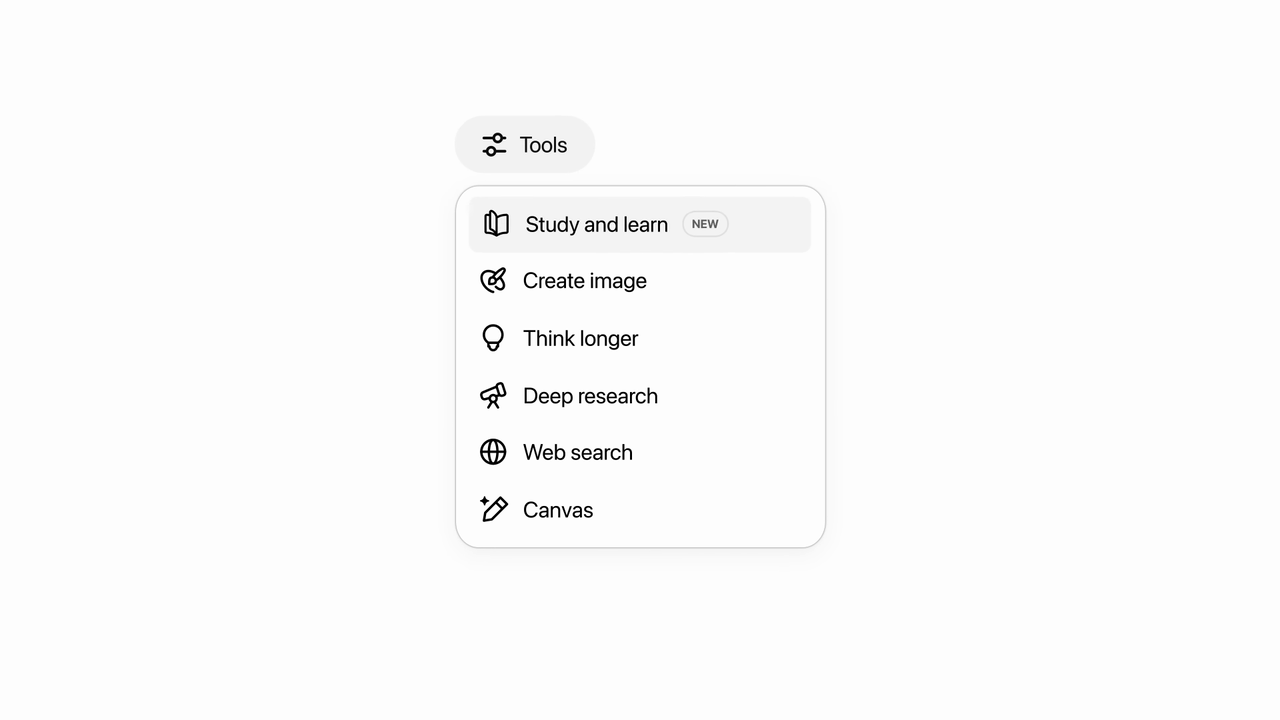
Menu builds and target is emphasized Rows become visible and the study option is highlighted. Sampled span; broad boundaries ±125 ms.
2.733–3.733s
Highlighted feature hold The selected-looking menu row remains readable. Sampled span; broad boundaries ±125 ms.
8.500–9.367s
Composer established The attachment, mode chip, input, and suggestions are visible before typing. Sampled span; broad boundaries ±125 ms.
9.500–9.967s
Partial prompt entry The excerpt ends while the prompt is still being entered. Sampled span; broad boundaries ±125 ms.
Frame controls and diagram links load this short clip into memory for reliable source-cadence seeking. The player can step every frame; only the specifically stated window received consecutive-frame visual inspection.
Read the sequence.
What the opening is doing
The title is followed by the Tools menu and a highlighted study option. A book icon opens, a benefit statement appears on a colored field, and a homework attachment is isolated on white. The composer then appears with that same recognizable attachment inside it. This is a chain of feature, meaning, and use rather than a single continuous UI recording.
The native check shows the isolated attachment through f252 and the formed composer at f253. There are no intervening decoded frames showing the large thumbnail traveling and shrinking into the input.
The document content and black remove badge survive the framing change. That repeated object makes the cut understandable even though its size and position change immediately.
The sampled title has a comparatively stable left edge while it grows. It should not be reconstructed with the same continually recentering behavior observed in the Work suffix.
The feature is named, located in a menu, represented by a book, connected to homework, and only then used in the composer. Each step answers a different question for the viewer.
Typography
At 125 ms sampling, the title grows from a stable-looking left edge and shows a partial product-name suffix before completing. The later white benefit statement uses a colored field and an underline beneath its key word. Both statements have completed readable holds. Exact character cadence and underline construction are outside the native window.
Handoff into the product
At f252 (8.400 s) the attachment remains isolated; at f253 (8.434 s) it is already a smaller thumbnail inside the composer, alongside controls and study suggestions. The following frames retain this UI while its framing changes slightly. This is object continuity across a cut, not evidence of a continuous shrink animation.
Inspect the consecutive-frame window · 20 frames
8.234000–8.900000s, end exclusive. All 20 frames from f247 through f266 were inspected. The isolated rounded document tile with its black remove badge remains through f252 (8.400 s). The next decoded frame, f253 (8.434 s), contains the complete composer, heading, study chip, suggestions, and the document as a small upper-left attachment. Its scale and position have changed in that one frame step, without an intervening travel or shrinking sequence. The following frames keep this formed interface visible while its framing adjusts. The repeated document and badge carry visual recognition across the cut.
Half-open source interval [8.234, 8.900) s, f247–f266 inclusive. This establishes the delivered frame transition, not whether an editor used hidden intermediate assets or a particular compositing method. The attachment's earlier arrival, title cadence, and later text entry remain sampled. Source indices are zero-based. Every image in this strip corresponds to a decoded source frame; no in-between frames have been generated.
05 / 23.976 fps / 0.000–9.009s
Codex: establish the whole app before the first close-up
A readable title cuts directly to a formed desktop app; the product view rests before the pointer and closer framing explain an action.
Bars: sampled visible states, not source keyframes. Select a bar to inspect its starting frame. The ◆ is a proposed cue, not an observed OBS event.
Read the timing diagram as text
Lane / interval
Source time
Observed state
0.125–0.626s
Short title build Successive sampled states add the product name and final word. Broad sampled boundaries ±125 ms.
0.626–2.503s
Readable complete-title hold The complete line remains visible across the sampled interval. Broad boundaries ±125 ms; exact cut details are confined to the native window.
2.628–3.379s
Full-window orientation hold The formed desktop app is shown before the featured selector action. Sampled span; broad boundaries ±125 ms.
3.504–4.380s
Approach the selector Pointer activity is followed by a closer view and a visible menu. Sampled span; broad boundaries ±125 ms.
4.380–5.631s
Menu and target choice The menu remains visible while the pointer reaches a row. Sampled span; broad boundaries ±125 ms.
5.881–6.632s
Chosen workspace hold The updated workspace name remains visible before attention moves down. Sampled span; broad boundaries ±125 ms.
6.757–8.759s
Move to the composer The lower input area becomes the larger focal region and then holds. Sampled span; broad boundaries ±125 ms.
8.884–8.967s
Prompt begins Partial text entry appears near the excerpt end. Broad sampled boundaries ±125 ms; this is not a completed task.
3.504–6.632s
Identify and choose the workspace The pointer accompanies the selector passage and remains after the menu closes. Sampled span; broad boundaries ±125 ms.
6.757–8.967s
Input focus Pointer/caret activity moves into the composer before visible characters appear. Sampled span; broad boundaries ±125 ms.
Frame controls and diagram links load this short clip into memory for reliable source-cadence seeking. The player can step every frame; only the specifically stated window received consecutive-frame visual inspection.
Read the sequence.
What the opening is doing
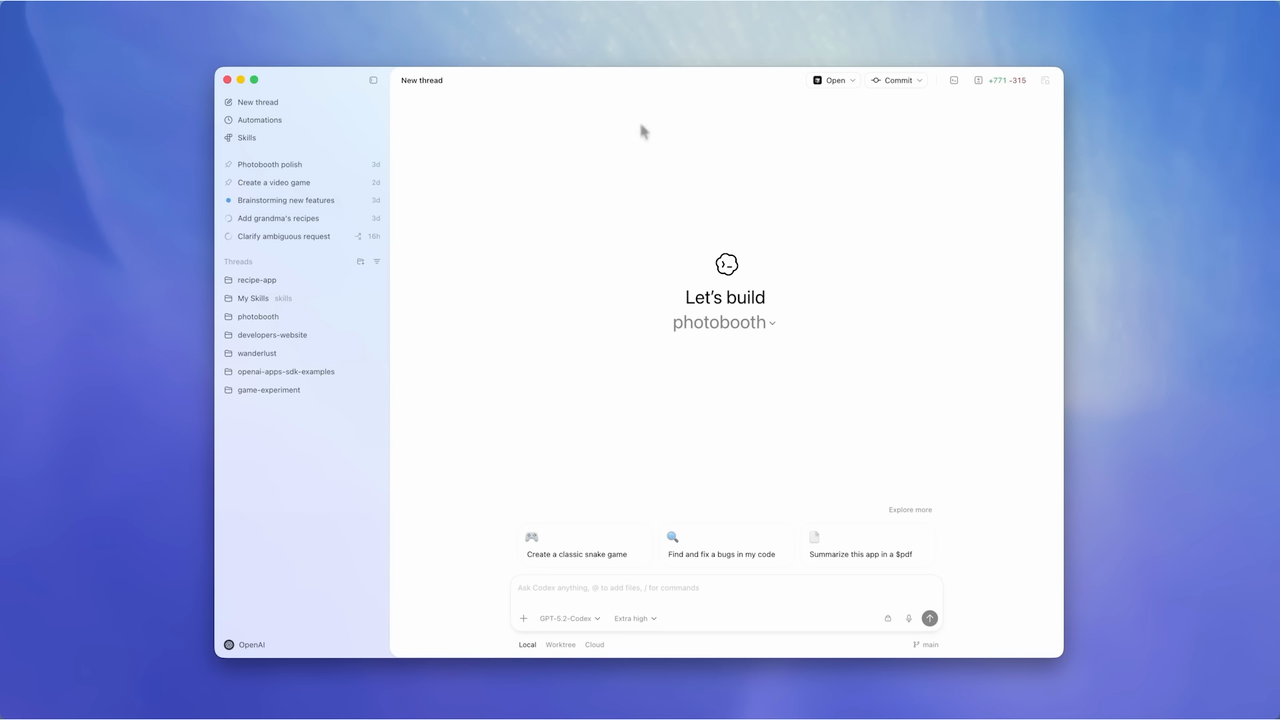
The title completes quickly and remains on screen much longer than its initial build. It then gives way to the entire app window on a blue-violet surround. The window is established before pointer movement and a closer view of the workspace selector. The selected workspace receives another hold before the framing moves to the composer. Context, target, and action are introduced in separate steps.
The native pass shows the title through f61 and the complete app window at f62. The title does not visibly shrink into the application, and the first product frame is not an isolated control.
Sixteen inspected frames after that cut retain the initial full-window view without the later selector menu. The sampled sequence continues to establish that view before the featured pointer action.
At 125 ms sampling, the title appears to build from a comparatively fixed left edge. Its completed wording is readable from the 0.626 s anchor through the 2.503 s sample.
The closer selector view follows the whole-window introduction. A chosen workspace is then held before the composer becomes the next focal area, avoiding two competing targets at once.
Typography
The sampled opening shows successive title words and a partial final app word, with a comparatively stable left edge. The whole phrase has a clear completed hold. This is a sampled cadence description; the native window begins near the end of the hold and does not establish each letter's arrival.
Handoff into the product
Source f61 (2.544 s) is still the complete title; f62 (2.586 s) is the formed application on its colored surround. Later sampled frames move closer to the workspace selector before a menu is shown. The initial handoff is a direct cut plus orientation time, not a demonstrated text-to-interface morph.
Inspect the consecutive-frame window · 20 frames
2.419000–3.253000s, end exclusive. All 20 frames from f58 through f77 were inspected. The complete title remains on white through f61 (2.544 s). At f62 (2.586 s), the entire formed app window appears against the blue-violet surround, including sidebar, central workspace heading, and lower composer. No intervening decoded frame blends or scales the title into this view. Frames f62–f77 retain the initial full-window composition without the selector menu that appears later. The first handoff therefore gives the viewer application context before the closer action passage.
Half-open source interval [2.419, 3.253) s, f58–f77 inclusive. This checks the delivered cut and the immediate orientation interval only. Title construction and the later pointer, close-up, and menu timings remain sampled. No claim of pixel-identical stillness, hidden production method, or measured UI latency is made. Source indices are zero-based. Every image in this strip corresponds to a decoded source frame; no in-between frames have been generated.
06 / 60.000 fps / 0.000–10.500s
Codex Apps: dismantle the collage, leave white space, then show the task
A busy opening removes its objects in stages and leaves seventeen white frames before the application appears.
Bars: sampled visible states, not source keyframes. Select a bar to inspect its starting frame. The ◆ is a proposed cue, not an observed OBS event.
Read the timing diagram as text
Lane / interval
Source time
Observed state
0.367–1.000s
Introduction builds The small opening line develops before the montage. Sampled span; broad boundaries ±125 ms.
1.000–2.250s
Readable introductory hold The completed line remains alone before the oversized tile arrives. Sampled span; broad boundaries ±125 ms.
4.367–5.250s
Capability sentence builds Smaller centered text takes over after the large word tiles leave. Sampled span; broad boundaries ±125 ms.
5.250–6.750s
Readable sentence amid changing examples The completed wording persists while nearby examples change and begin leaving. Sampled span; broad boundaries ±125 ms.
2.367–3.500s
Separate word arrivals Now, you, and can are introduced as large colored blocks at different sampled moments. Broad boundaries ±125 ms.
3.500–4.250s
Word tiles depart The large blocks leave while miniature app examples remain. Sampled span; broad boundaries ±125 ms.
3.000–5.250s
Examples accumulate and change Several miniature application examples and small graphics surround the text. Sampled span; broad boundaries ±125 ms.
5.250–6.867s
Examples leave in stages The montage becomes less crowded until the lower example is last. Broad sampled boundaries ±125 ms; the final exit order is checked natively.
7.250–8.250s
Task view and acknowledgement The cropped application view is visible and acknowledgement text builds. Broad sampled boundaries ±125 ms; this is edited footage, not measured response time.
8.500–9.867s
Work explanation and counter changes More response text and changing task-counter values are shown. Sampled span; broad boundaries ±125 ms. Do not infer real elapsed time.
10.117–10.483s
Reframe to the result The view widens to include the resulting application surface near the excerpt end. Sampled span; broad boundaries ±125 ms.
Frame controls and diagram links load this short clip into memory for reliable source-cadence seeking. The player can step every frame; only the specifically stated window received consecutive-frame visual inspection.
Read the sequence.
What the opening is doing
A small introductory line is overtaken by large colored word tiles and several miniature app examples. The tiles depart while the examples remain around a centered capability sentence. The examples then leave in separate steps. A short white interval separates this montage from a close application view containing a real task prompt. The task view later reframes to show a result within the same excerpt.
The native window resolves a distinct exit order: the upper example disappears, the clock-like graphic follows, the capability sentence leaves, and the lower example is last. The collage does not fade out as one unit.
Seventeen consecutive white frames, f414–f430, separate the last example from the application at f431. That delivered interval is about 0.283 s, not a missing observation between coarse samples.
The first application frame is already a close, partially cropped task view. Later frames shift the framing while the acknowledgement text builds; the preceding collage is not shown transforming into that window.
The complete central sentence stays readable while surrounding examples change or leave. Later task-counter changes in the sampled demo are editorial evidence only and cannot establish how long the product actually took.
Typography
The small introductory line has a completed hold. Large now, you, and can tiles then arrive as separate words, overlapping the quieter line and miniature examples. Those tiles leave before a smaller centered capability sentence builds and holds. This opening uses several text scales and word-level staging rather than one continuous title treatment; exact early character timing remains sampled.
Handoff into the product
The native pass checks the end of the montage, the white interval, and the first application frames. The application appears after the white gap as a formed, cropped task view. It subsequently moves within the frame while acknowledgement text develops. The result reframe near 10.1–10.5 s was sampled, not checked frame by frame.
Inspect the consecutive-frame window · 66 frames
6.600000–7.700000s, end exclusive. All 66 frames from f396 through f461 were inspected. The upper example is still present at f399 and absent at f400 (6.666667 s). The clock-like graphic remains through f406 and is absent at f407; the central capability sentence remains through f407 and is absent at f408 (6.800 s). The lower example persists through f413, then f414 (6.900 s) is white. Every frame from f414 through f430 is white: seventeen frames spanning about 0.283 s before the application first appears at f431 (7.183333 s). That first task view is already formed and cropped at the right and bottom edges. Subsequent frames shift its framing while acknowledgement characters begin appearing, reaching the words I'm on it by the end of the inspected window.
Half-open source interval [6.600, 7.700) s, f396–f461 inclusive. The final departure order, white-frame count, and first application view are native-frame findings. Earlier collage arrivals and the later result reframe remain sampled. No hidden transition layers, exact easing, or real task-duration inference is supported. Source indices are zero-based. Every image in this strip corresponds to a decoded source frame; no in-between frames have been generated.
For the all-hands workflow
A cue needs room for a human response.
The presentation video starts first. A recognizable content transition can cue the switch to OBS, but the switch is manual—not an instantaneous event controlled by these diagrams.
Use the supplied talking-head recording as the timing master. During the single storyboard review, establish the opening lead-in, intended cue moment, and playback offset. A reference film’s source timestamp is not that offset.
Keep the two videos separate
The generated presentation should not duplicate the talking head’s spoken narration. This research does not add music or sound effects by default. The closing requirement remains separate: finish the presentation while the talking-head wave and pause are still playing.
Keep the product and identity authentic
Adapt the choreography to your own identity and genuine product captures. Source film branding, interfaces, and demo data are examples for analysis, not production assets.
Method & data
Precise about what was inspected.
Six deeper opening studies within the existing 100 films, counted separately from the 100 motion studies and six closing-logo studies. This pass covers visuals and typography, not audio.
Timing bars annotate observed visible states at reviewed source frames. Wider sequences were sampled at 125 ms targets; events can occur between samples. Bars are not recovered animation layers, exact cut boundaries, or original keyframes. Exact consecutive-frame claims are restricted to the stated native windows.
Evidence stills come directly from decoded source frames, resized to 1280 × 720 and stored as lossless WebP; they are not screenshots of the re-encoded excerpts. The silent context clips preserve the source cadence. Frame numbers in the player are one-based within the excerpt; source indices in the evidence are zero-based.
Cue markers are proposed adaptations of recognizable source transitions, not instructions used by the source films. Their source timestamps are not production playback offsets. Set the lead-in and manual reaction allowance against the supplied talking-head footage during storyboard review.
No audio analysis was performed. A deeper sound-to-motion study and a full closing-message/CTA timing study remain separate follow-ups. This chapter does not turn edited demo time into a product-performance measurement.